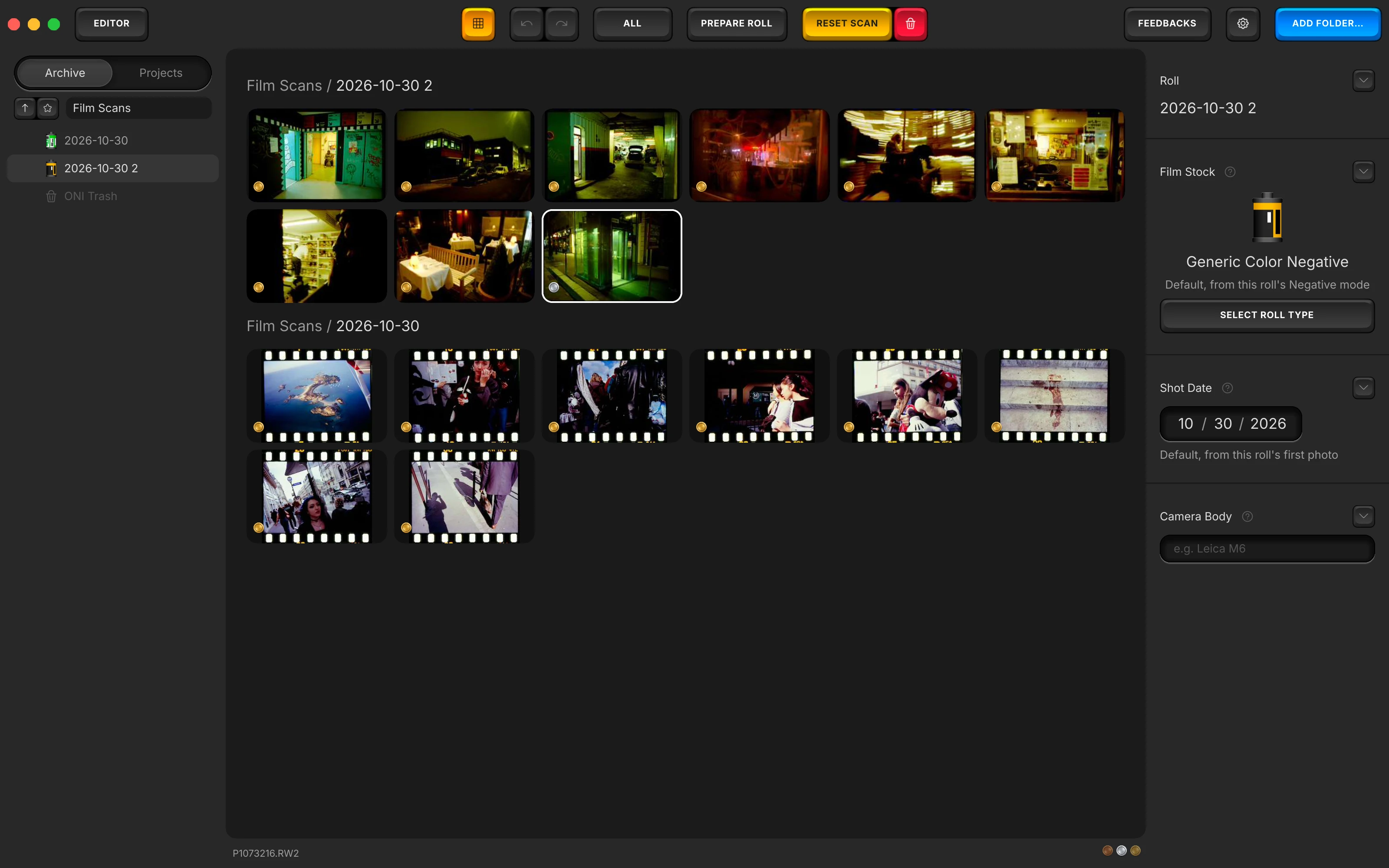
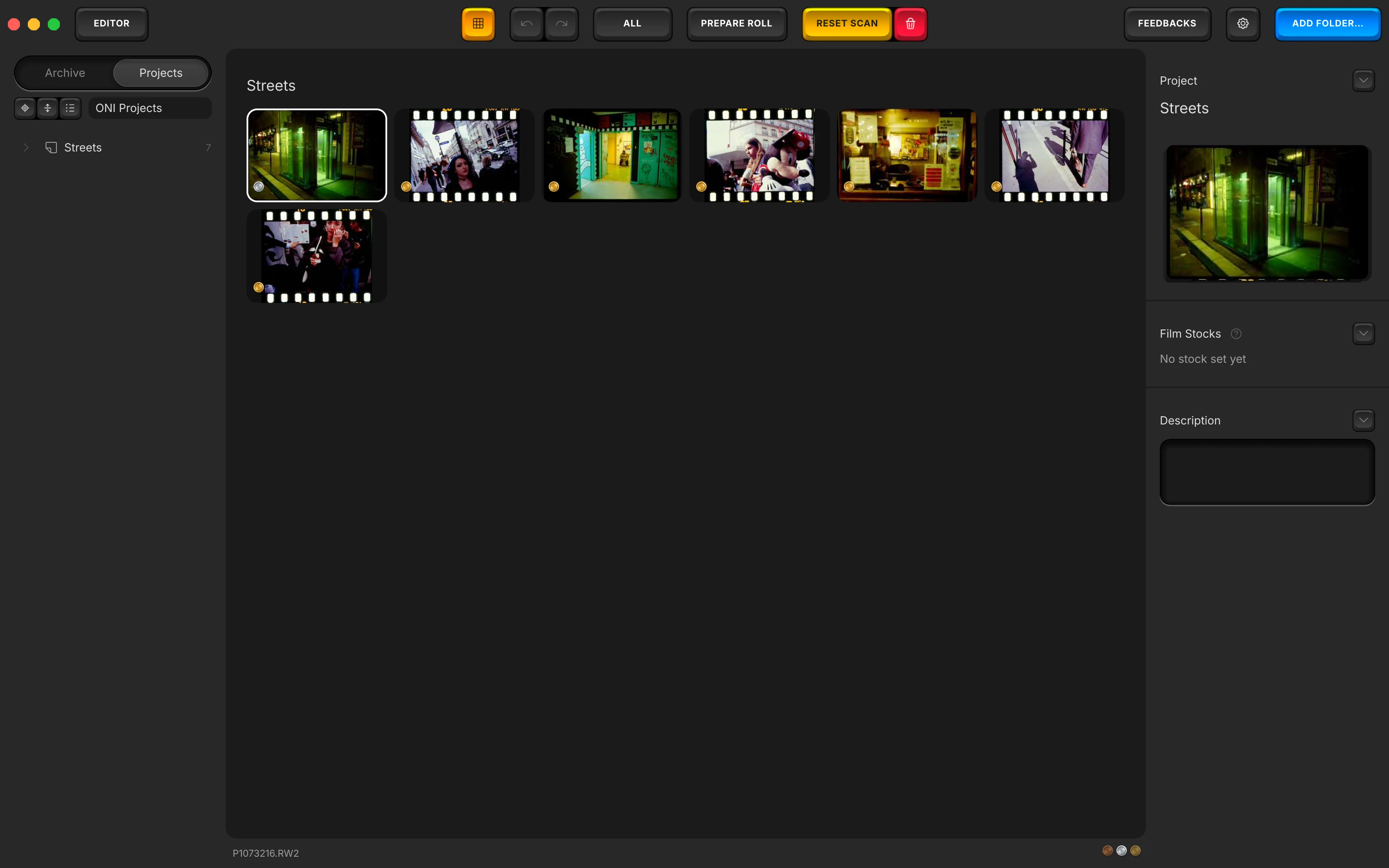
What this is. Two independent ways to look at the same photographs. Archive keeps every roll where you put it, boxed and named. Projects cuts across that: pull frames from any roll, in any box, into one place, and what you are looking at there is the same file and the same sidecar, not a copy.

Frames already group into a roll with ⌘G, the one gesture that never changes. Archive is the layer above a roll: a box holds several rolls, named however suits you, a trip, a year, a client. Projects is a second, separate index of those same rolls: select frames from anywhere and turn them into a project with one command, and a box can hold projects too, the same way it holds rolls.

The archive and the projects described here live inside Open Negative Initiative, a free macOS application for converting and editing scanned film: colour negatives, positives and black & white, from a camera scan or a scanner. It runs on its own, with no host application to buy. What is described on this page decides nothing about how a photograph looks; it only decides where you find it again. macOS 13 or later. Apple Silicon and Intel.

Free, macOS 13 or later. Nothing here moves a file on your disk; it only indexes where things are.

Archive: a box for every roll

A box is created from a selection of rolls, or by dragging one roll onto another in the sidebar; drop enough rolls together and name the result. The sidebar itself reads like a layers panel, an expanding tree of boxes and rolls rather than a flat list, so a roll several trips deep stays two clicks away instead of a scroll.

A roll carries its own small form: a name, a film stock picked from a list, a shot date that defaults to the capture date of its first photo, and a camera body typed in free. The film stock is not filed away once chosen: the roll's icon in the sidebar becomes that stock's own canister, so a box full of rolls reads at a glance as which emulsions are inside it, not as a row of identical folder icons.

Projects: the same photos, seen a different way

Select frames from wherever they live, in one roll or across a dozen, and turn the selection into a project. Add more to it later the same way. A frame does not leave its roll or its box to join a project: it is referenced, not moved, and a single frame can sit in as many projects as it is useful in.

Because a project reads and writes the same sidecar as the archive does, a setting changed from inside a project is the setting the archive shows too. The point of a project is what it saves you from: pulling together a themed set, or the frames going into one delivery, without opening one box after another to find them.

Exporting a project

A project exports exactly like a roll does: a plain batch to the folder you choose, in whatever output the export sheet is already set to. Nothing about a project changes what export does or writes a folder structure back onto disk; the organising happens once, inside the app's own index, not twice.

One thing this does not add: copyright, creator or IPTC metadata still does not travel onto an exported file, project or roll alike. That gap is unchanged by any of this.

What it will not do yet

  • No advanced filtering. A coloured tag on a frame is the only filter today; sorting or searching by film stock, date range or camera body across the whole archive is not built yet.

Questions

Can one photo belong to more than one project?
Yes. A project is an index, not a folder: the same frame can sit in as many projects as you put it in, and it stays exactly one file on disk either way.
Does editing a photo inside a project change it in the archive too?
Yes. A project shows the same frame and reads and writes the same sidecar as the archive does. There is only one copy of a setting, wherever you happen to be looking at it from.
Does exporting a project keep the files organised on disk?
No. Exporting a project writes a plain batch of files to the folder you choose, the same as exporting a roll. The organisation lives in the app's index, not in a folder structure it writes for you.
Is this the same as a Lightroom collection?
The shape is familiar: pull frames from anywhere into one place without moving them. What is specific here is that a roll shows the actual film stock's canister in the sidebar rather than a generic folder icon, and that there is no advanced filtering yet beyond a colour tag.

Described in an interview with Rémi Courtillon, 29 August 2026, on version 0.0.34 of the application.

Next: once a roll is boxed, a contact sheet is how you balance all of it at once rather than frame by frame. Or read everything else the app does, control by control.

GET IT

Free, no account, no trial limit. Your rolls stay files on your own disk.